Posts

Showing posts with the label revision control

Git Rebase Explained
Image
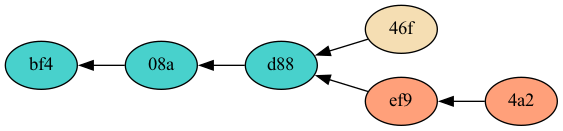
Introduction Rebase is a helpful git command that can be used to turn a branchy two-headed version history into an easy to follow linear one. A linear history is much easier for a human eye to follow and a human brain to understand. Rebase is a very safe command to use, despite some fear that people have about it. This post should explain how rebase works and clear up any misunderstandings about it. Rebase Basics The short summary of rebase is that it cuts commits out of the git history and reconnects them somewhere else. Let's say the common scenario comes up: you commit a change to the main branch of a repository, you then run  git fetch , and in come a couple changes that other people made on the main branch. If your commit is version 46f and the others that just came in on the fetch are versions ef9 and 4a2, your version history might look like this: The main branch now has two heads, 46f and 4a2. You can run  git rebase  to disconnect your commit from version d88 and...

How To Retroactively Annex Files Already in a Git Repo

UPDATE : With current versions of git, I no longer recommend git annex or git LFS unless you really need to store your large files on a separate server from your git repository. Just add your large files to git like any other file and when you clone, you can avoid downloading the full repository history with git clone --filter=blob:none and use git as normal. Table of Contents How To Retroactively Annex Files Already in a Git Repo First Tries: filter-branch, filter-repo Success with git rebase –interactive Added binary files Deleted binary files Modified binary files Moved binary files Dealing with Tags Clean Up and Results How To Retroactively Annex Files Already in a Git Repo In my last post I talked about how surprisingly easy it is to use git annex to manage your large binary files (or even small ones). In this post, I'm going to show how hard it is to go back and fix the mistake you made when you decided not to learn and use git annex at the start of your p...

Git Annex is Great

UPDATE : With current versions of git, I no longer recommend git annex or git LFS unless you really need to store your large files on a separate server from your git repository. For the simple use I describe here, just add your large files to git like any other file and when you clone, you can avoid downloading the full repository history with git clone --filter=blob:none and use git as normal. I'm developing the website for my business and I have a mix of code an images in my git repository. Since everyone seems to know that you shouldn't keep large binary files in your git repo, I decide to see what the current solutions to that problem are. After doing a little bit of searching, I narrowed things down to git lfs and git annex . Git lfs looks so nice and simple, except I'm not using github. Sure, you can set up your own central git lfs server yourself, but that sounded suddenly not so nice and simple. The website for git annex immediately hits you with all the ...

Git Branches Are Not Branches

Git branches have confused me (someone who uses mercurial a lot and git a little) for a while, I have finally realized why. The problem is that git branch is a poorly chosen name for the thing that they really are. You see, all the changeset history in git is stored as a Directed Acyclic Graph (DAG). The code history might be simple and linear which will make the DAG have a simple path like so (o's are nodes in the graph, called changesets, -'s are references from one node to another, with time progressing from left to right): o-o-o-o-o Or the code history and corresponding DAG could be more complicated: o-o-o / o-o-o o-o-o-o-o / \ / \ o-o-o-o-o-o-o-o-o-o-----o-o Most English language speakers would agree that those parts of the DAG (code history) where a node has two children (representing two parallel lines of development) are called, branches. The above example has four branches in the history, four branche...

Mercurial (as of 2.1) Now Has Phases

In my last post I pondered (ranted?) on the reluctance of Mercurial people to edit repository history, especially as compared to git people. Today I noticed that Mercurial 2.1 has been released, and it has a new feature that makes editing your local repository much safer, phases (more detail here ). To me this looks like a really cool idea. Phases explicitly mark changesets as either public (have been pushed or pulled, and should not be edited) or draft (still local to your repository and can be freely edited). Changesets are given a phase automatically behind the scenes (though you can override this, of course), and history editing tools respect phases so that now it is even harder to shoot yourself in the foot when editing your repository history with tools like rebase or mq. There is also one more phase, secret, that can be enabled for use with patches in your Mercurial Queues. Secret changesets will not be pushed, pulled, or cloned (or even show up in the output of incomi...

What Is So Wrong With Mercurial's Named Branches?

I just installed the very latest version of mercurial, 2.0.2 . It added a new little feature that warns you when you create a branch. Huh? This is what it looks like: $ hg branch foo marked working directory as branch foo (branches are permanent and global, did you want a bookmark?) Really? Have we let the git advocates push us this far? Do we really need to start discouraging named branches? I googled around to see if I could find where the self-hate for mercurial's named branches is coming from and I found things like this , "it is almost never a good idea to use this facility for short-term branching, since branches created this way are inherently 'eternal'." (those quotes around eternal are good, actually, but you didn't explain why they should be there), and this , "you can never really delete branches (since that would mean altering older commits)." (editing history, oh noes!), and others like this. And these were all written by a...

Incremental Merge with Mercurial

I just learned how to merge incrementally with Mercurial. I wasn't really even aware of what that means until I learned about it. Most people use a graphical diff/merge tool with Mercurial such as kdiff3 , and for a good reason. Resolving merge conflicts any other way is much more difficult. Normally when you run hg merge it merges all the files right then, and pops up your graphical merge tool right when conflicts occur. You can leave the gui window up and sort of ignore it for a while, but then you wonder what happens if your computer loses power or you need to reboot for some reason. Will your working copy be left in some weird state? What if you have already spent a lot of time resolving tricky conflicts on a previous file, you'd hate to lose that work. Or what if you know one particular file is going to be onerous and you'd like to resolve conflicts there first? Wouldn't it be nice if Mercurial could just present you a list of files with conflicts and let...

My .emacs is now in Mercurial

A while ago I decided to start maintaining my .emacs file under revision control. I picked git because it seemed like the cool thing to do. I put it on gitorious so that I could easily sync it with my home and work machines, and it was public in the off chance that it might help out some other emacs user. Today I converted it from git to mercurial, because for some reason hg incoming is more intuitive and easier for me to remember than git fetch && git log ..origin/master Maybe I'm weird that way. Anyway, the new repo is on bitbucket . That is all.

Mercurial is Teh Awesome

My team at work recently switched from Subversion to Mercurial for revision control. That’s no small feat for a hardware design team (see: Averse to Change ). It helps a little that we are mainly FPGA people (a lot “softer” than an ASIC), but there are still definitely hardware attitudes about change. Our software partners made the change a while ago, so they already had some process and infrastructure set up that made it easier for us, plus they could point out from real experience that it was an easy transition with many benefits. That helped a lot. I took the lead on making the change for our team (is it true everywhere that on a digital design team, the verification engineers are the de-facto “tool guys” as well?). I studied up on how exactly mercurial works. I mean, I had the basic idea down since I’ve been toying with the fancy new revision control tools for a while now , but I didn’t really reach enlightenment until a few months ...

Ode to the Compaq 8510w

I got a sweet new laptop at work. It's a Compaq 8510w . The Core 2 Duo T7500 is fast, 3 GB of RAM is luxurious, and the 1900x1200, 15.4 inch widescreen LCD is pretty. I installed Ubuntu 8.10 and it sleeps (suspends to RAM) and wakes up like no other Linux box I've ever had, which is very, very nice (though the XO has started doing that with the latest update extremely well too). I installed the corporate image of windoze XP under VirtualBox. With the processor's virtualization extensions it runs pretty snappily. I can watch the corporate propaganda WMV movies, use Lookout for calendaring, and access the internal IE-only "web" apps just fine. I went with VirtualBox instead of kvm this time, kind of just to see what the differences where. I had to set up bridge networking because the corporate image didn't like not having a corporate IP address. I hear the newest version of VirtualBox doesn't need this, but here is the script I run to set up bridged...

You Really Should Hack Linux

I have a confession to make. I'm an avowed Linux geek, yet I haven't complied the kernel in years. The last time was probably in school when I had to write my own scheduler for the kernel as an assignment, which isn't all that bad when you consider that most people compiling their own kernels are just enabling some obscure driver that they needed. They haven't made Major Modifications to a core piece like The Scheduler. Right? Right? Well, OK, the scheduler wasn't anything to write home about, but it still felt pretty l33t. Anyway, I've decided it's time I delve into the source of Linux again. It's one of the most successful large software projects on the planet, and it's completely open for anyone to dig into. It would be a horribly wasted opportunity for a serious software engineer to miss out on, especially someone interested in nitty-gritty low-level stuff. Even if you aren't interested in OS code or drivers at all, you could study...

Hardy Upgrade Broke Apache Logging

I noticed today that my upgrade to Hardy broke my Apache logs for my little family website that I'm hosting. It turns out that I had a LogFormat definition in apache2.conf called comonvhost. All my sites in sites-available used this with a line like this: CustomLog /var/log/apache2/access.log comonvhost Well, in the upgrade, the commonvhost LogFormat was removed from my apache2.conf and replaced with three other LogFormats named, "combined," "common," and "referer (sic)." My log file became filled with lines that simply said, "commonvhost." Here I'd like pause and say that having /etc under revision control made this very easy to debug. All I had to do was run git diff -r <some commit before the upgrade> on the various files in /etc/apache2 and it became obvious very quick what had happened. I'm so glad I set that up. Anyway, after changing my sites-available files to all use the new combined LogFormat instead of...

Subversion Question

I have a question about Subversion that I can't quite coax Google into answering. Is there any problem with copying an existing working copy and using that instead of running svn checkout to create a new working copy? You might want to do this if checkouts from your Subversion repository are very slow, see. I tried it out and it seems to work, but I wonder if there are any hidden pitfalls to this method. If you have any ideas please comment.

How To Convert Bazaar Repo to Git

This was way more difficult that I thought it would be, but I have conquered. I may be the only person in the world who even cares about doing this, but I'm writing it here so I don't forget. I think it's hard because both the revision control tools, and the conversion tool are all still pretty new and in a state of flux. I finally got it to work using bzr version 0.15.0, git version 1.5.2.3, and tailor version 0.9.29. Both bzr and git are just what I had on my Ubuntu Feisty Fawn box that I keep up to date with backports and everything. Tailor version 0.9.26 is in the feisty repositories, but it most definitely didn't work for this. I grabbed the tarball for the latest source from here . You can just untar it and run it right from there. OK, now, once you have tailor, to make this work, you need a tailor configuration file. Just put it anywhere and name it whatever you like. Mine looked a little like this: [DEFAULT] verbose = True patch-name-format = ...

'git revert' Is Not Equivalent To 'svn revert'

I just learned that if you have some changes in your working tree that you want to get rid of, you don't type 'git revert' like you might guess. No, that's what cvs, subversion, mercurial, and bazaar (to name a few) use revert to mean, but not git. With git, revert is used to undo actual commits. Thankfully, you can undo your revert with another 'git revert', I just learned. So let me repeat to be clear, if you have changes to your working files that you want to abandon, DO NOT do this: git revert HEAD That will undo your last commit. Do this instead: git reset --hard HEAD I'm glad I have that straightened out now. I'm wondering if /etc was really a good place for me to start out playing with git. UPDATE: Nearly two years later and I'm still getting comments on this. I'm glad I've been able to help people out this way. The discussion in the comments is good, and one thing I'd like to point out is that I now always use...

Put /etc Under Revision Control (with git)

UPDATE : There is a much easier way now : sudo aptitude install etckeeper There, now etc is under revision control and changes are automatically committed with a helpful message after you install new packages. Thanks for the tip, Marcelo! Read on for the original blog entry. --- I put my /etc directory under revision control. I used git. It's awesome. Not that I think I'm going to wholesale copy my /etc from one machine to another, nor because I'm going to branch my /etc directory and spend weeks developing some cool new feature (whatever that would look like...) and then merge it back into the main branch. No, it's mostly because I like the idea of having the big "undo" option that having things under revision control provides. Having to commit changes and write check-in comments when I make changes helps me stay more organized too. It's never good when I go in willy-nilly to make a "quick change" to some configuration file. I r...

Gallery 1 on Feisty

Another post in the continuing saga of my upgrade from Edgy to Feisty. Last time , I mentioned that my Gallery was still not working. I get this line in my apache2 error log ( /var/log/apache2/error.log ): ...gallery/.htaccess: Option Indexes not allowed here To work around it, I need to go to the automatically generated .htaccess file in my gallery directory and comment out the line: Options -Indexes +FollowSymLinks If I re-run the configuration wizard, the line comes back and things top working again. I can't figure out why Options Indexes and FollowSymlinks aren't allowed. It seems they must have been with Edgy, but I can't see what changed when looking at the RCS history of my apache configuration files (yes, I keep any configuration files that I modify under RCS on this machine. I've started using mercurial and/or bazaar for the entire /etc directory on other machines). Is it something different about the newer version of apache? Google isn't...

Mozilla's Version Control Research

I stumbled upon a really interesting blog entry about the Mozilla Project's research into version control. I actually remembered reading the first part a while back, and now part two is out. They have done some good research, and considered things like importing from CVS, performance, and how well the different systems work on windoze (hitting different areas than I did ). Follow the links in the entries to see the nitty gritty details, and, if for no other reason, go read both parts to see the awesome Mortal Kombat screenshots. I won't spoil the end and tell you which one they are going with (though the news is two weeks old and you probably knew all of this already. Where have I been? Sheesh).

Resolve Bazaar Merge Conflicts with Emacs

How to fix bizarre merge conflicts with emacs will be in a different chapter. Here you will just find tips for working with the Bazaar revision control system , also known as, bzr. This assumes you are fairly comfortable with the basics of bzr and emacs . When you do a bzr merge to pull in changes from a different branch (try bzr pull first, it will tell you if you need to bzr merge instead), it's possible that conflicting edits have been made to the files you are versioning. In that case bzr will tell you about it, and drop three new files in your directory tree for each file with conflicts. They will be named, file.THIS , file.OTHER , and file.BASE . "Whoa! Scary! What do I do with all of these?" you might say to yourself. I'm here to answer that question, with a handy emacs tool called ediff. Open emacs and and type M-x ediff-merge-with-ancestor . It will ask for three files, which you should give in this order: file.THIS , file.OTHER , and file.BASE . ...

CVS to Mercurial

I decided to convert my simple .emacs cvs repository to mercurial. The instructions for converting repositories on the mercurial wiki were a little confusing, but here’s what I got to work on my Ubuntu Edgy Eft box: aptitude install mercurial aptitude install tailor Then, in the directory where I wanted my mercurial repository (make sure there isn’t a cvs checkout of the module you are converting there!): mkdir hg-temp cd hg-temp tailor -v --source-kind cvs --target-kind hg --repository /home/bryan/cvsrepositories/dot-emacs --module dot-emacs -r INITIAL > dot-emacs.tailor emacs dot-emacs.tailor In the dot-emacs.tailor file, change subdir from . to MODULENAME (which is dot-emacs, in my case), and remove /MODULENAME from root-directory, like the wiki says. Then add the line: patch-name-format = at the end of the “project” section 1 . Then: tailor --configfile dot-emacs.tailor This creates three files, tailor.state.old, tailor.state, and project...