Posts

Showing posts with the label git

Git Rebase Explained
Image
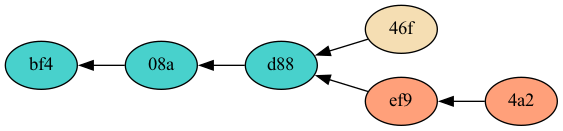
Introduction Rebase is a helpful git command that can be used to turn a branchy two-headed version history into an easy to follow linear one. A linear history is much easier for a human eye to follow and a human brain to understand. Rebase is a very safe command to use, despite some fear that people have about it. This post should explain how rebase works and clear up any misunderstandings about it. Rebase Basics The short summary of rebase is that it cuts commits out of the git history and reconnects them somewhere else. Let's say the common scenario comes up: you commit a change to the main branch of a repository, you then run  git fetch , and in come a couple changes that other people made on the main branch. If your commit is version 46f and the others that just came in on the fetch are versions ef9 and 4a2, your version history might look like this: The main branch now has two heads, 46f and 4a2. You can run  git rebase  to disconnect your commit from version d88 and...

How To Retroactively Annex Files Already in a Git Repo

UPDATE : With current versions of git, I no longer recommend git annex or git LFS unless you really need to store your large files on a separate server from your git repository. Just add your large files to git like any other file and when you clone, you can avoid downloading the full repository history with git clone --filter=blob:none and use git as normal. Table of Contents How To Retroactively Annex Files Already in a Git Repo First Tries: filter-branch, filter-repo Success with git rebase –interactive Added binary files Deleted binary files Modified binary files Moved binary files Dealing with Tags Clean Up and Results How To Retroactively Annex Files Already in a Git Repo In my last post I talked about how surprisingly easy it is to use git annex to manage your large binary files (or even small ones). In this post, I'm going to show how hard it is to go back and fix the mistake you made when you decided not to learn and use git annex at the start of your p...

Git Annex is Great

UPDATE : With current versions of git, I no longer recommend git annex or git LFS unless you really need to store your large files on a separate server from your git repository. For the simple use I describe here, just add your large files to git like any other file and when you clone, you can avoid downloading the full repository history with git clone --filter=blob:none and use git as normal. I'm developing the website for my business and I have a mix of code an images in my git repository. Since everyone seems to know that you shouldn't keep large binary files in your git repo, I decide to see what the current solutions to that problem are. After doing a little bit of searching, I narrowed things down to git lfs and git annex . Git lfs looks so nice and simple, except I'm not using github. Sure, you can set up your own central git lfs server yourself, but that sounded suddenly not so nice and simple. The website for git annex immediately hits you with all the ...

Git Branches Are Not Branches

Git branches have confused me (someone who uses mercurial a lot and git a little) for a while, I have finally realized why. The problem is that git branch is a poorly chosen name for the thing that they really are. You see, all the changeset history in git is stored as a Directed Acyclic Graph (DAG). The code history might be simple and linear which will make the DAG have a simple path like so (o's are nodes in the graph, called changesets, -'s are references from one node to another, with time progressing from left to right): o-o-o-o-o Or the code history and corresponding DAG could be more complicated: o-o-o / o-o-o o-o-o-o-o / \ / \ o-o-o-o-o-o-o-o-o-o-----o-o Most English language speakers would agree that those parts of the DAG (code history) where a node has two children (representing two parallel lines of development) are called, branches. The above example has four branches in the history, four branche...

Mercurial (as of 2.1) Now Has Phases

In my last post I pondered (ranted?) on the reluctance of Mercurial people to edit repository history, especially as compared to git people. Today I noticed that Mercurial 2.1 has been released, and it has a new feature that makes editing your local repository much safer, phases (more detail here ). To me this looks like a really cool idea. Phases explicitly mark changesets as either public (have been pushed or pulled, and should not be edited) or draft (still local to your repository and can be freely edited). Changesets are given a phase automatically behind the scenes (though you can override this, of course), and history editing tools respect phases so that now it is even harder to shoot yourself in the foot when editing your repository history with tools like rebase or mq. There is also one more phase, secret, that can be enabled for use with patches in your Mercurial Queues. Secret changesets will not be pushed, pulled, or cloned (or even show up in the output of incomi...