Posts

Showing posts with the label ubuntu

How to Disable Ubuntu command-not-found

Ubuntu, in all its helpfulness, has a feature that tries to guess what you mean when you type commands at the bash prompt. If you type a command that's found, it runs it, of course. If you type a command that it can't find, it takes a moment to search available packages for install and suggest what you might do to make that command available. It sometimes looks like this: $ foo No command 'foo' found, did you mean: Command 'xoo' from package 'xoo' (universe) Command 'fop' from package 'fop' (universe) Command 'fox' from package 'objcryst-fox' (universe) Command 'zoo' from package 'zoo' (universe) Command 'goo' from package 'goo' (universe) foo: command not found It's great when you have a new system and you haven't yet installed everything you need. Type emacs before emacs has been installed, and it will helpfully tell you the exact command to use to install it. After a...
ls colors on Ubuntu

I ls -ed some files today and noticed a few listed with blue backgrounds and white text. I use the --color option to ls because it's pretty, and because the colors provide information that's not always blindingly obvious from regular ls output. Case in point, what did this blue background with white text mean? It turns out that, at least for Ubuntu 9.10 an 10.04 (the two I tried), you can see a list of the colors that ls uses for various things by typing: dircolors --print-database Now, I had a hunch that these files were hardlinks, and sure enough, I saw this line: HARDLINK 44;37 # regular file with more than one link And looked up a few lines to see that, yes, 44 is blue and 37 is white. Cool. Just to be extra sure I passed the file names to the stat command and saw the, links: 2 for those files.

How not to mount a particular server with autofs

There are a couple servers that I use the fancy new (to me at least) autofs scripts to mount on my Ubuntu 9.10 client machine. You know, the ones that let you just cd /net/servername/exportname and it automagically turns that into the command to mount that export from that server at that mountpoint (so cool). To test something out though, I wanted to make sure one of the servers was not auto-mounted by autofs. The simple way to tell autofs to ignore that server (let's call it, foobarbaz) is to edit /etc/auto.net and put this snippet right after the key="$1" line: # don't mount foobarbaz, for now: if [ $key = "foobarbaz" ]; then exit fi Then restart autofs: sudo /etc/init.d/autofs restart And autofs automagically mounts any nfs server except foobarbaz.

Convert putty key to openssh on linux

I had a putty generated ssh key that I wanted to use on my linux box (long story). Turns out it's simple to convert it using linux tools. Here are the steps: sudo aptitude install putty-tools Then, to convert a private putty key named id_dsa.ppk to an openssh key named id_dsa: puttygen id_dsa.ppk -O private-openssh -o id_dsa Then just type in the key's passphrase and you're done. You can type puttygen --help to see similar options for public keys.

Ubuntu 9.04 + X11 forwarding + Windows XP + Putty + XMing

Wow, I sure thought this was a longshot when I went searching for an obscure problem I was having. Strangely enough, someone else using putty and Xming to run X11 applications from a Jaunty machine also got the error message: PuTTY X11 proxy: wrong authentication protocol attemptedError: Can't open display: localhost:10.0 And their fix worked for me too. Thanks, timkoop on the Ubuntu Forums!

Upgrade from 8.10 to 9.04

Pretty much just like the upgrade from 8.04 to 8.10 , minus the xorg problem. The /etc/apache2/sites-available/default didn't even change this time, but I still had to kick apache to get it to serve my virtual host. Not sure what's going on there. One thing I noticed that I forgot to write down about the last upgrade, that is still weird with Jaunty, is the network manager applet has a red X on it, as if I'm not connected to a network, even though networking is configured how I like and working just fine. I'll have to google that one someday.

Upgrade from 8.04 to 8.10

I'm a little behind on my version of Ubuntu at home. Last night I finally upgraded to 8.10. Very smooth compared to past experiences. Video didn't work at first. I just deleted my xorg.conf entirely and then X started up just fine. My apache virtual host was not being served. Everything caused the default junk in /var/www to be served up. Here's what I believe the relevant diff off /etc/apache2/sites-available/default was: bryan@brzo:/etc/apache2/sites-available$ diff -urNp default.dpkg-old default.dpkg-new --- default.dpkg-old 2007-10-31 21:38:12.000000000 -0700 +++ default.dpkg-new 2008-09-19 06:41:53.000000000 -0700 @@ -1,5 +1,4 @@ -NameVirtualHost * -<VirtualHost *> +<VirtualHost *:80> Restoring NameVirtualHost * and <VirtualHost *> statments seemed to fix the problem. I have not taken the time to understand why, and if anyone wants to comment and enlighten me I'll greatly appreciate it. Look for another post soon on how the u...

Laptop Twinview Dual-external Displays

I feel like I'm so close on this, but I'm just not getting it. I mentioned my 8510w laptop setup previously, and how I have two xorg.conf files that I switch between, restarting X to configure using either my dual-external displays or my laptop display. Well, I'm not satisfied with this setup. I've been playing with xrandr and MetaModes and I can use xrandr to switch from the dual external displays to the single laptop display, and I can sort of switch back to the external displays, but it either only uses one of them and you can pan to view the whole dual-display-sized screen, or it uses the laptop display and one of the external displays. Grr. Has anyone been able to get this to work? I've seen mention of using refresh rates or EDID to somehow get this working, but I haven't seen any solid examples of what to do. I've also seen suggestions to just use nvidia-settings. That's a lot of clicking. I'd love just a simple script to run.

Web Site Stats Are Fun

I hooked Google Analytics up to this blog and have had fun looking at all the stats in their different views. I was about to do the same for my little family blog that I run on my home machine, when I realized that I have all the log files right there, I shouldn't need Google's crazy javascript to figure the stats out for me. Cue awstats . I combined advice from here and here to get it set up, and it wasn't too difficult. It's cool to see where people are coming from (some friends of ours have blogs, and we didn't even know it!), and what crazy search terms people find our site with ("are fumes from rotten milk toxic?"). I know, web site stats are old news for most hardened bloggers, but I'm liking it.

Ode to the Compaq 8510w

I got a sweet new laptop at work. It's a Compaq 8510w . The Core 2 Duo T7500 is fast, 3 GB of RAM is luxurious, and the 1900x1200, 15.4 inch widescreen LCD is pretty. I installed Ubuntu 8.10 and it sleeps (suspends to RAM) and wakes up like no other Linux box I've ever had, which is very, very nice (though the XO has started doing that with the latest update extremely well too). I installed the corporate image of windoze XP under VirtualBox. With the processor's virtualization extensions it runs pretty snappily. I can watch the corporate propaganda WMV movies, use Lookout for calendaring, and access the internal IE-only "web" apps just fine. I went with VirtualBox instead of kvm this time, kind of just to see what the differences where. I had to set up bridge networking because the corporate image didn't like not having a corporate IP address. I hear the newest version of VirtualBox doesn't need this, but here is the script I run to set up bridged...

Linux Programmer’s Manual on Ubuntu

I typed man sscanf on my Ubuntu 8.04.1 system at home and was shocked to see this reply: No manual entry for sscanf Never had a UNIX or UNIX-like system ever left me out in the cold like this without help. Fortunately, I found where to get the manpages . Just sudo aptitude install manpages-dev and everything is all better. Phew.

You Really Should Hack Linux

I have a confession to make. I'm an avowed Linux geek, yet I haven't complied the kernel in years. The last time was probably in school when I had to write my own scheduler for the kernel as an assignment, which isn't all that bad when you consider that most people compiling their own kernels are just enabling some obscure driver that they needed. They haven't made Major Modifications to a core piece like The Scheduler. Right? Right? Well, OK, the scheduler wasn't anything to write home about, but it still felt pretty l33t. Anyway, I've decided it's time I delve into the source of Linux again. It's one of the most successful large software projects on the planet, and it's completely open for anyone to dig into. It would be a horribly wasted opportunity for a serious software engineer to miss out on, especially someone interested in nitty-gritty low-level stuff. Even if you aren't interested in OS code or drivers at all, you could study...

Ubuntu Hardy - Worse Photo Import Than Before

Image
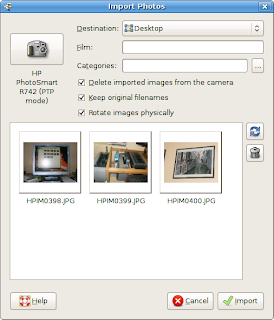
I like f-spot a lot, but it has a few things that really bug me. I guess I should stop complaining and get involved , but then I'd have to learn C#. I don't know if I can bring myself to do that ;-) Anyway, here is what I used to see when I connected my digital camera to my Ubuntu 7.10 machine: Now that I have Ubuntu 8.04, when I plug in my camera I first see this: Yes, that's two confusing choices for one camera. Choosing either gets the same results: Yup, it's offering to download some xml files and some other non-image files, and more room is devoted to showing you the full path to the files (that you really don't care about) than to showing you the actual thumbnail image. The option to delete from the camera what you just downloaded is gone too. Oh, and no videos will actually show up in F-spot, the program that is now doing this importing. Was anyone who uses a digital camera consulted on this move? I'm not alone in not liking this chan...

"could not stat the resume device file"

We have a local mirror of the Ubuntu repos here at work and they are pretty fast. I couldn't figure out how to get update-manager to use them, so I upgraded my desktop machine to Hardy Heron by changing everything in /etc/apt/sources.list from gutsy to hardy and typed sudo aptitude update && sudo aptitude full-upgrade and let it run. It asked a couple questions about modified config files and such which I answered, and then it was done. I rebooted and it put up the pretty "UBUNTU" with the new pulsating KITT -esque progress bar...and it never went beyond that. I finally hit alt-f1 and saw that it was waiting for my input with the prompt: resume: could not stat resume device file /dev/sda10. Please type in the name to try again or press ENTER to boot the system I hit enter and it seemed to boot just fine. This is a pretty annoying thing to have to do every time you boot, so I searched until I found the solution for me: reinstall initramfs-tools , like so...

KVM in Ubuntu Hardy Heron

Apparently there are some new gui apps for running and interacting with KVM on Ubuntu 8.04. After reading those two blog entries, I fired up virt-manager and virt-install, and wasn't very impressed. I didn't like the idea of piping the graphics through VNC when all I want is to run a virtual machine on my local desktop. And why do you need a confusing GUI when the command-line utilities for kvm/qemu are so straightforward? Now that I've said that, I'll point you at this overly complex KVM guide just so you can follow the first part to check if your CPU supports hardware virtualization . I would pretty much ignore the rest of that guide. Oh, and if your CPU doesn't support hardware virtualization, you can pretty much replace kvm with qemu in all the below steps and this will still work, just slower. Allright, here's how I set up a new KVM instance on my Ubuntu Hardy Heron box. I installed Hardy on the virtual machine in this example, but you could ju...

Windoze Activate After Hardy (and KVM) Upgrade

Image
This is kind of funny. At least I thought so. I fired up my windoze kvm instance for the first time since upgrading to Hardy Heron, and I got a pop-up dialog from XP telling me that hardware has changed significantly (click to see the full-sized image): Weird.

Hardy Upgrade Broke Apache Logging

I noticed today that my upgrade to Hardy broke my Apache logs for my little family website that I'm hosting. It turns out that I had a LogFormat definition in apache2.conf called comonvhost. All my sites in sites-available used this with a line like this: CustomLog /var/log/apache2/access.log comonvhost Well, in the upgrade, the commonvhost LogFormat was removed from my apache2.conf and replaced with three other LogFormats named, "combined," "common," and "referer (sic)." My log file became filled with lines that simply said, "commonvhost." Here I'd like pause and say that having /etc under revision control made this very easy to debug. All I had to do was run git diff -r <some commit before the upgrade> on the various files in /etc/apache2 and it became obvious very quick what had happened. I'm so glad I set that up. Anyway, after changing my sites-available files to all use the new combined LogFormat instead of...

Upgrade to Hardy, Many Sound Woes

WARNING I needed a place to take notes while debugging sound issues after upgrading my desktop from Gutsy to Hardy, so here they are. This is probably a pretty boring read, so continue at your own risk. Upgraded to Hardy today. Got some indistinct error message at the end, so I made sure and ran aptitude update && aptitude -y full-upgrade && dpkg --configure -a a few times before and after rebooting. Then, when I fired up Firefox (fired up... Firefox... get it...?) and went to youtube I realized I didn't have flash anymore. I aptitude installed flashplugin-nonfree, restarted Firefox, and videos worked. Yay! Then I went away for a while. When I came back youtube videos had no sound. This is actually a problem that I was having before the upgrade. Not even a reboot helped. I fired up Amarok to see if mp3s still played. Nope, it froze. I googled a bit and found some pulse audio help which led me to believe that maybe I needed to add myself to the puls...

Where'd My Second Core Go?

While discussing the specs of our new workstations with a coworker, I ssh’ed to my blazingly fast home machine and catted /proc/cpuinfo for a quick comparison. My pride in my hand crafted workhorse was quickly squelched when only one CPU appeared in the output. “What is up with that?” I wondered. After some unaming and googling I discovered that Ubuntu had somehow switched me to the lame 386 kernel when I really wanted the generic kernel . Funny thing is, the generic kernel was installed, just not the grub default. Editing my menu.lst and rebooting quickly lead me to my next problem, no nvidia driver. Thankfully google found me the answer again . I can’t believe I’ve been computing with only one of my cores. And for who knows how long! The shame of it all. I'll be watching you much more closely from now on, Ubuntu.

Windows XP on the XO!

Image
Yes, that's Windoze XP on my XO laptop. Click on the image for a larger version. The resolution doesn't quite match the XO screen's native resolution. Minor detail. OK, so it's not running directly on the XO hardware. It's running on a KVM virtual machine. And actually, that's not running on the XO hardware either. It's running on my Core 2 Duo machine that runs Ubuntu. What's running on the XO is an ssh client, an X server, and some good wifi networking. The XO makes a sweet little thin client. So, um, nothing really to see here. Sorry if I got anyone's hopes up. Or fears.