Posts

Is this a game... or is it real? What's the difference?

People are absolutely obsessed and enamored by this new type of Artificial Intelligence (AI) we have. Generative AI. Large Language Models. Whatever you want to call them. When ChatGPT first came out it didn't seem that novel to me. I've played video games that seemingly conversed with me. I've chatted with ELIZA . But when I started playing with ChatGPT it was obvious that it was much better than those ever were. So, like David asked Joshua in War Games , I asked ChatGPT if it would like to play a game. I can't remember if it offered hangman or if I did, but it happily played hangman with me. And it happily told me letters I guessed were right or wrong until I was "hanged" and then it revealed the secret word. Letters I had been told were not in the word were indeed right there in the word. Thus began my trust issues with this new chatbot AI. Today I am very grateful for those trust issues as I watch others become completely enamored and enthr...
My New Favorite Phone Game: termux

 A lot of people when bored pull out their phone and play games.  Games just don't do it for me for some reason.  I mean, I played chess for a while, and recently I tried Shoot Bubble and 5 Dice (generic Yahtzee), but for some reason I always forget I even have them available and I end up just scrolling Twitter :-/  My feed is pretty good, if someone gets overly political or negative (usually its a combination of the two) I block them, but stuff still leaks in.  Usually if Twitter is holding my attention for a long time it's because it's making me angry.  I don't like that.  I think I've found a better solution for when I'm bored and pull out my phone: termux . Termux is a linux command-line environment for Android.  It's a kinda like wsl (or cygwin if you are old like me) or Terminal.app, but for your phone.  It's almost linux but not quite.  Normally I find that very frustrating, especially if I'm trying to get real work done (you may ...

Git Rebase Explained

Image
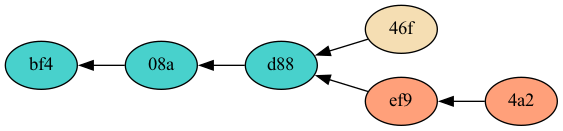
Introduction Rebase is a helpful git command that can be used to turn a branchy two-headed version history into an easy to follow linear one. A linear history is much easier for a human eye to follow and a human brain to understand. Rebase is a very safe command to use, despite some fear that people have about it. This post should explain how rebase works and clear up any misunderstandings about it. Rebase Basics The short summary of rebase is that it cuts commits out of the git history and reconnects them somewhere else. Let's say the common scenario comes up: you commit a change to the main branch of a repository, you then run  git fetch , and in come a couple changes that other people made on the main branch. If your commit is version 46f and the others that just came in on the fetch are versions ef9 and 4a2, your version history might look like this: The main branch now has two heads, 46f and 4a2. You can run  git rebase  to disconnect your commit from version d88 and...

My 2013 DVCon Paper and Poster

I just noticed that my 2013 DVCon paper and poster are no longer archived on the DVCon website.  So, for my records at least, here they are: The poster:  Poster: ASIC-Strength Verification in a Fast-Moving FPGA World The paper:  ASIC-Strength Verification in a Fast-Moving FPGA World Apologies for the PDF of the paper, but converting it to html requires more time than I have at the moment.

Zmodem File Transfer With GNU Screen

I've been using screen as my serial terminal (as opposed to minicom or picocom) for a long time now.  Today I had the need to transfer a file from my PC to the embedded device I was connected to with screen.  Networking was not working, and a co-worker reminded me that zmodem was a way to transfer a file over the serial port.  I googled for instructions on exactly how to use zmodem and I found stack overflow answers and blog entries all mentioning GNU screen for doing so, but none of them really explained it right.  Here's what worked for me today. To transfer a file from my PC to the embedded device: in screen hit ctrl-a : zmodem catch in screen, at the linux command-line on your device type: rz screen will prompt with an sz command, just append the filename to that command and hit enter Note that this works best if the file is in the same directory as you ran screen from.   To send a file from the embedded device to your PC: in screen hit ctrl-a : zmodem catc...

Giving Bitcoin as a Gift

 If you've been following along, you know I was considering giving bitcoin as a Christmas gift .  I did end up giving bitcoin to friends and family for Christmas.  I'm pretty happy with how it turned out.  I went with the HD Paper Wallet solution, and so I wrote some python code to generate paper wallets .  The code is open source, and instructions are in the README there on github.  You'll probably want to tweak the template to customize it for you instead of me.  Hopefully someday I can modify the code to make that easy, but I'm pretty new at generating images and PDFs.  The code I write for my day job doesn't involve pretty pictures, or words even :-)

Giving Bitcoin as a Gift, Initial Thoughts

 'Tis the season and I'm thinking about how to give bitcoin as a gift, to non-technical people, without requiring them to do anything like create an account or download software in order to accept it. Paper Wallet Bitcoin paper wallets have been around a long time.  The concept is simple.  Generate a send/receive address pair (private/public key pair) and print them on a piece of paper.  Basic operations: To add bitcoin to the wallet, send some bitcoin to the receive address To check your balance, type or scan the public key into any blockchain explorer  To gift that bitcoin, just hand over the piece of paper To send the bitcoin on the blockchain, type or scan the private key into the bitcoin wallet software of your choice Pros: simple, no fancy hardware or software required for them to receive the bitcoin Cons: No guarantee that the giver didn't keep a copy of the private key Private key could be easy for someone else to see/copy Private key could be easily los...

Traffic in Little Cottonwood Canyon

This is my comment on the Utah Department of Transportation's plans to "to provide an integrated transportation system that improves the reliability, mobility and safety for residents, visitors, and commuters who use S.R. 210." This is long, but I have tried to order it in such a way that the most important points come first, so don't give up now.  At least read the first 3 paragraphs, please. First and foremost I'd like to ask, what problem are we really trying to solve?  Roughly 355 days a year there are no reliability, mobility, or safety problems on S.R. 210.  The weather is good, the roads are clean and clear, and traffic flows at or above the speed limit of the road.  We all need to understand that the problems with reliability, mobility, and safety only happen about 10 days a year, if the skiers are lucky and we get that many big snow storms. Mobility Congestion on roads is annoying, but we need to seek to understand it before we try to fix it.  Congesti...

Fix for Cura's Ender 3 gcode

A child of mine finally asked for a 3d printer.  I knew that if I tried to push it, no kid would be interested, so I didn't.  But finally, one of them asked for one.  We ordered the Creality Ender 3 that night from their website and some filament from Amazon.  It all arrived a couple days later and we enjoyed the process of assembling it and then finally printing the gcode files that were on the SD card that came with the printer.  Including those was a really nice touch.  Once we got the bed close enough to the nozzle it all worked great. After the initial success we found some models on thingiverse, sliced them with Cura , and then saw the printer do something like this (not my video) over and over.  Too much filament in the wrong place, no filament in the wrong place.  It was a strange and bewildering start-up sequence to watch.  I searched the internet for advice and didn't find much.  I finally just opened up the gcode file that C...

Linux Environment Management: direnv does it all

  Linux Environment Management: direnv does it all A few years back I wrote about different options for linux environment management .  I recently learned about another option, direnv.  I think I'm convinced that it is the only tool you need.  Read this as if it's another section added to that previous post. Use direnv Straight from  the direnv website : "direnv is an extension for your shell. It augments existing shells with a new feature that can load and unload environment variables depending on the current directory.  Before each prompt, direnv checks for the existence of a .envrc file in the current and parent directories. If the file exists (and is authorized), it is loaded" This happens automatically, so it solves the problem of the "Explicit Environment Files" solution above in a way that is much more convenient than the "Per-command Environment Files" solution. The .envrc files are in standard shell syntax and it properly unloads environme...

Effectively Internet Filtering in 2020

(To skip my rambling intro and get to the nitty gritties, search this page for, "After that long introduction") In college, back when the internet was young, I hated the clumsy ineffective internet filtering that was in place on campus. It often blocked sites that were perfectly fine, and did not catch all the sites of the type that they were trying to block. Fast forward 10 years or so and I saw my children stumbling upon some content that I didn't want them to see on my unfiltered home internet and my attitude changed a bit. Back then web filtering was pretty easy. Nothing was encrypted and DansGuardian was the go-to tool. You set up a transparent web proxy and DansGuardian would scan the entire content of every website that you downloaded in your home. Incriminating words and phrases would trigger its blocking and it would replace the website you were downloading with an explanatory message. The beauty was that there was no need to scour the web, categorize every web...

How To Retroactively Annex Files Already in a Git Repo

UPDATE : With current versions of git, I no longer recommend git annex or git LFS unless you really need to store your large files on a separate server from your git repository. Just add your large files to git like any other file and when you clone, you can avoid downloading the full repository history with git clone --filter=blob:none and use git as normal. Table of Contents How To Retroactively Annex Files Already in a Git Repo First Tries: filter-branch, filter-repo Success with git rebase –interactive Added binary files Deleted binary files Modified binary files Moved binary files Dealing with Tags Clean Up and Results How To Retroactively Annex Files Already in a Git Repo In my last post I talked about how surprisingly easy it is to use git annex to manage your large binary files (or even small ones). In this post, I'm going to show how hard it is to go back and fix the mistake you made when you decided not to learn and use git annex at the start of your p...

Git Annex is Great

UPDATE : With current versions of git, I no longer recommend git annex or git LFS unless you really need to store your large files on a separate server from your git repository. For the simple use I describe here, just add your large files to git like any other file and when you clone, you can avoid downloading the full repository history with git clone --filter=blob:none and use git as normal. I'm developing the website for my business and I have a mix of code an images in my git repository. Since everyone seems to know that you shouldn't keep large binary files in your git repo, I decide to see what the current solutions to that problem are. After doing a little bit of searching, I narrowed things down to git lfs and git annex . Git lfs looks so nice and simple, except I'm not using github. Sure, you can set up your own central git lfs server yourself, but that sounded suddenly not so nice and simple. The website for git annex immediately hits you with all the ...